Attribution confidence and reason flags
Every tracked call from a number pool shows a confidence level and the reasons behind it. Confidence describes how uniquely the call could be linked to one session. It doesn't describe whether the session had campaign data: a High confidence call can still have no UTM parameters if the visitor arrived directly.
Confidence levels
| Level | Console text | Meaning |
|---|---|---|
| High | Uniquely attributed to a single web session. | Exactly one session held the number when the call started. |
| Medium | Attributed to the only active session near the caller (within 50 km). | Several visitors held the number, but only one was within 50 km of the caller. |
| Low | Attribution is ambiguous — multiple candidate sessions existed. | Several sessions held the number and location couldn't single one out, or the caller's or a session's location was unknown, so the closest, or most recent, session was chosen. |
| No attribution | No web session could be linked to this call. | No session held the number when the call started. |
| Static number | The number is a static tracking number. Attribution comes from its settings. |
"Near the caller" means within 50 km of the location the caller's carrier supplies.
Repeat calls are marked separately. If the same caller called the same tracking number in the previous 7 days and that call was attributed, the new call shows Repeat caller and inherits the confidence and session of the most recent attributed call. A repeat call counts as attributed, so each one restarts the 7-day window.
Reason flags
The attribution panel on a call lists the reasons for the result:
| Flag | Meaning |
|---|---|
| Single session match | One session held the number. Confidence is High. |
| Multiple sessions active | More than one session held the number. Location was used to choose. |
| Unique geographic match | Exactly one of the candidate sessions was near the caller. Confidence is Medium. |
| Closest geographic match | More than one candidate was near the caller. The closest was chosen. Confidence is Low. |
| Most recent session selected | No candidate was near the caller. The most recent session was chosen. Confidence is Low. |
| Caller location unknown | The carrier didn't supply a usable location for the caller, so the most recent session was chosen. Confidence is Low. |
| Missing location data | A candidate session had no location, so the most recent session was chosen. Confidence is Low. |
| No active session found | No session held the number. No attribution. |
| Repeat call | The caller called this number within the last 7 days. |
| Matched from previous call | The attribution was copied from that earlier call. |
Read the attribution panel
- In the Enfonica Console, open the tracking site and click Tracked calls.
- Open a call.
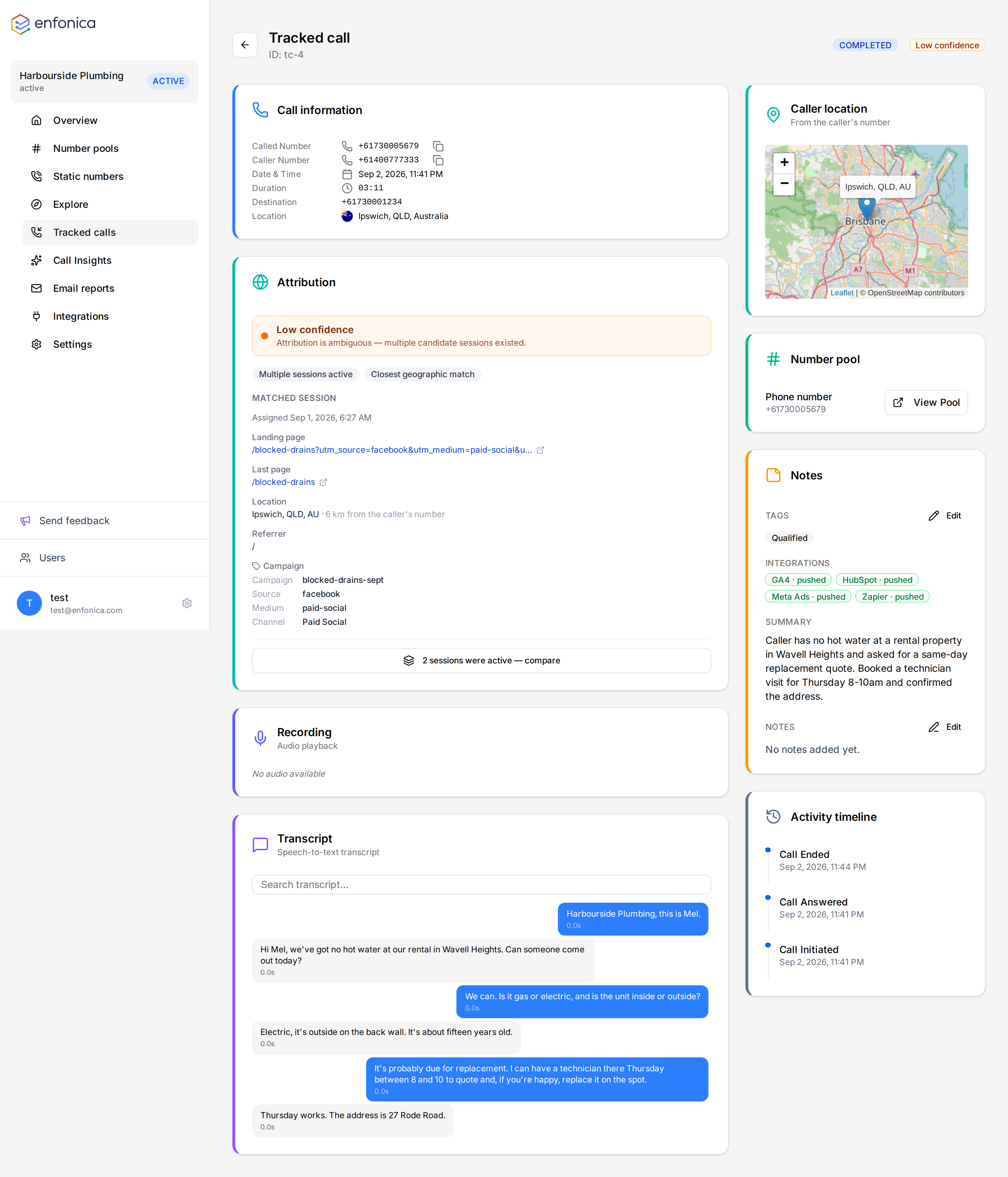
The panel on the right shows:
- A banner with the confidence level and its explanation.
- A Repeat caller notice, if the attribution was inherited.
- The reason flags.
- Matched Session: when the number was assigned, the landing page, the last page, the visitor's location and its distance from the caller, the referrer, the device and browser, and the campaign, source, medium, term, content and channel with a note on where the source was read from.
- For Medium and Low confidence, a Session comparison that lists the chosen session and each alternative with its time, landing page, campaign and distance.
Improve confidence
Low and Medium confidence come from numbers being shared between visitors. To reduce sharing:
- Add numbers to the pool. See Size a number pool.
- Limit rules to the pages visitors call from.
- Swap numbers only for paid traffic if organic attribution isn't needed.
Having trouble? See What does attribution confidence mean? in the Help Center.
Confidence isn't affected by missing UTM parameters or click IDs. For those, see Why attribution can be missing or ambiguous.