Call step
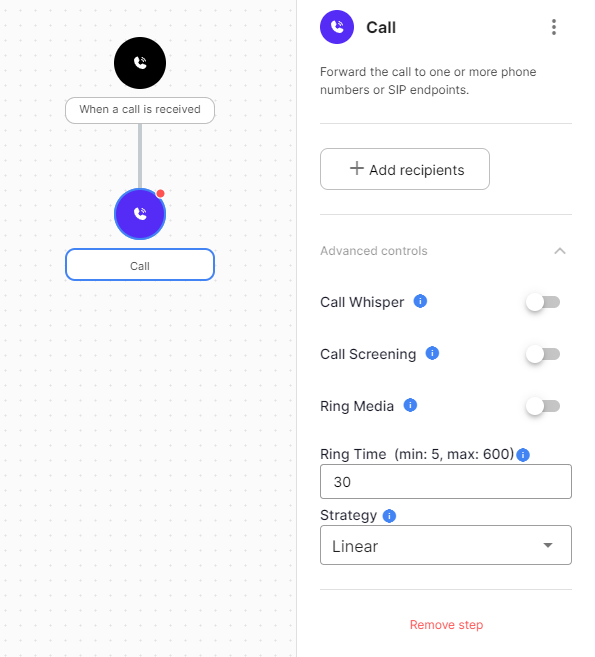
The Call step forwards the call to one or more phone numbers or SIP URIs.
Configuration
| Field | Description |
|---|---|
| Recipients | The phone numbers or SIP URIs to forward to. Drag recipients to reorder them. At least one is required. |
| Call Whisper | Audio played to the recipient when they answer, before the caller is connected. Use it to tell staff which campaign or number the call came from. |
| Call Screening | Audio played to the recipient when they answer, asking them to press 1 to accept the call. The recipient can decline without the caller knowing. |
| Ring Media | Audio or music played to the caller instead of ringing. |
| Ring Time | How long the call rings before it times out. |
| Strategy | The order recipients are called in. Linear calls them in order. Random calls one recipient at random. Random All calls all recipients in a random order. Simultaneous calls all recipients at once. |
Exits
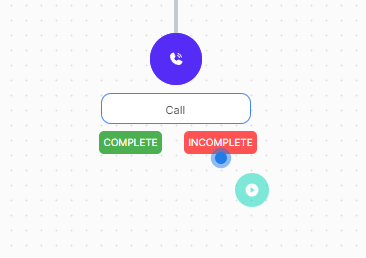
Add the next step to the Complete or Incomplete dropzone.
| Type | Description |
|---|---|
| Complete | A recipient answered. |
| Incomplete | No recipient answered: the call was rejected, not answered, busy, or failed. |